Family Plan Slot-26%
GoogleUpgrade
Google AI Pro — Join the Family plan
$3.90$5.26
Pay with USDTSold 625
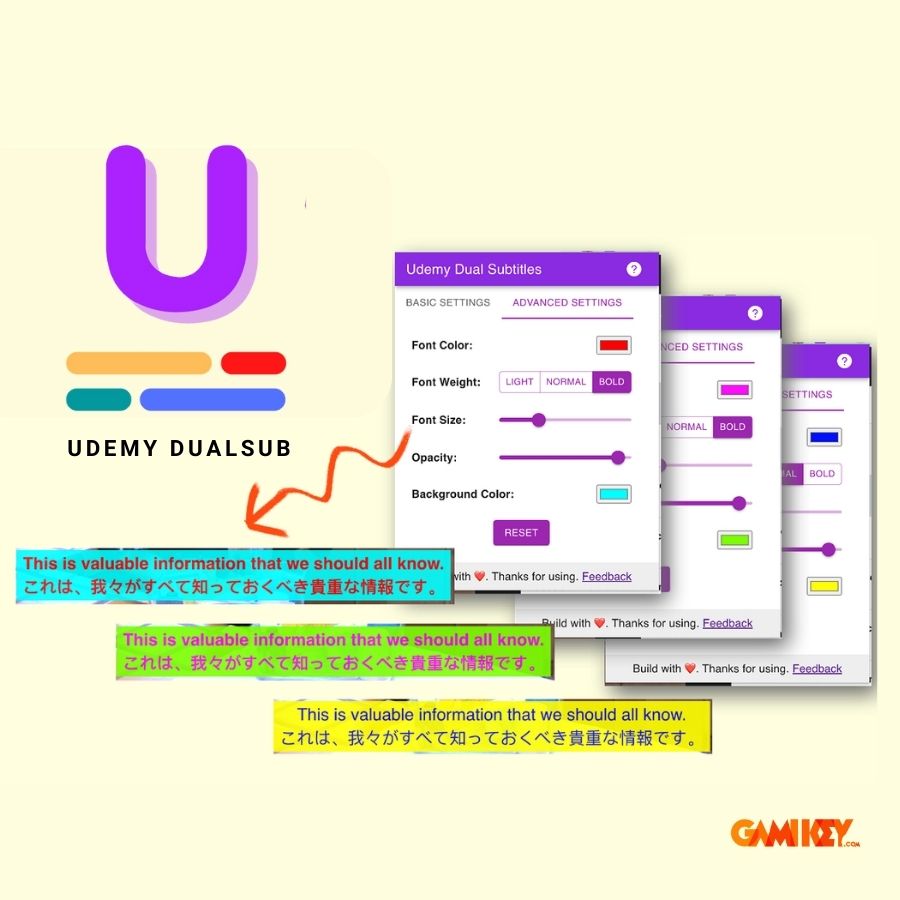
Upgrade Udemy Dual Subtitles 1 month — Official subtitles at Gamikey.net — Fast payment via USDT (TRC20/BEP20), automatic delivery and full warranty.
Udemy Dual Subtitles upgrade offers a superior learning experience with bilingual subtitles, helping you easily understand lectures and improve your language skills. Explore how to optimize your learning with this service through the article below from Gamikey.
Udemy Dual Subtitle is a browser extension that helps you display bilingual subtitles on Udemy courses. This extension allows you to learn more effectively by displaying subtitles in your native language alongside the course's original subtitles
Below are the notable features when using Udemy Dual Subtitles upgrade:
| Features | Details |
|---|---|
| Display bilingual subtitles | Translate official subtitles into your chosen language and display them in parallel with the original subtitles when dual-subtitle mode is enabled. |
| Preview supported courses | Translated subtitles appear in the preview video, making it easier to evaluate the course content from the start. |
| Udemy business support | Suitable for both individual and business users, expanding features for all objects. |
| Customizable subtitle style | Easily customize color, size, font thickness, opacity, and background color as desired. |
| Download subtitles | Export subtitles in .txt or .srt format, with options to download translated, original, or both subtitles. |
| Full-screen support | Dual subtitles work perfectly in full-screen mode, allowing you to flexibly adjust the size. |
Udemy Dual Subtitle is not only a learning support tool but also brings many superior benefits to learners. Below are the notable advantages that help you optimize your learning efficiency and save time when using:
Understand lessons better
When you can view subtitles in your native language, you will find it easier to understand the lesson.
Improve vocabulary
Reading subtitles in two different languages can help you learn new vocabulary.
Improved listening experience
Listening to lectures and reading subtitles at the same time can help improve your listening skills.
Time-saving
If you don't understand a word or phrase, you can quickly look it up in the dictionary by clicking on it.
Upgrade to Udemy Dual Subtitle to get a range of superior features, enhancing your learning experience comprehensively. Below is a detailed table of the outstanding features you will receive when using this service:
| Features | Details |
|---|---|
| Unlimited learning hours | Study comfortably without being limited by hours or months. |
| Support for course preview page | Subtitle translation appears on preview videos, making it easier to evaluate course content. |
| Udemy business support | Suitable for both individual and business users, providing optimal value for all objects. |
| Subtitle download support | Allow exporting video subtitles in .txt or .srt format, with options to download translated, original, or both subtitles. |
| Subtitle style adjustment support | Easily customize the color, size, font thickness, opacity, and subtitle background color. |
| Multi-device support | Using flexibly on multiple devices without any obstacles. |
| Official subtitle hiding support | Choose to display or hide original subtitles to optimize the learning experience. |
| Priority email support | Get priority support via email, helping to resolve issues quickly and effectively. |
To buy a Udemy Dual Subtitle account at a super discount price at Gamikey then you can follow these steps:
Step 1: Access the Gamikey website via the following link: /
Step 2: On the website's search bar and enter the keyword Udemy Dual Subtitle.
Step 3: Select account Upgrade to Udemy Dual Subtitles for 1 month - Translate subtitles from search results.
Step 4: Make a payment and purchase the upgraded Udemy Dual Subtitle account according to the instructions on the website.
Step 5: After completing the payment, you will receive information about upgrading your Udemy Dual Subtitle account via your email.
View more accounts at Gamikey:Cheap Netflix,Lifetime Spotify Premium,Cheap Youtube Premium account,buy Adobe license,Canva Pro lifetime,buy unlimited zoom account
After you select a package on the website and click "Buy now via Telegram Bot", the Bot system automatically converts the price from USD to USDT and delivers the upgrade directly in the Telegram chat frame after 30 seconds - 5 minutes.
Yes! Gamikey.net commits to a 1-for-1 exchange or refund based on the remaining usage time throughout the entire package period you registered.
Login information and accounts are automatically encrypted by the system and privately delivered via Telegram Bot with detailed usage instructions
All product names, logos, and brands are property of their respective owners. Gamikey is an independent reseller and is not affiliated with Udemy.
Clear global pricing in USD/USDT. Pay seamlessly via USDT (TRC20 / BEP20) through our automated Telegram Bot @gamikeybot and receive your credentials in seconds.
Every software license and subscription is priced clearly in USD and settled via USDT.
Fast automated processing with license keys and logins delivered straight to your chat.
Guaranteed replacement or dedicated support throughout your entire subscription period.