Family Plan Slot-26%
GoogleUpgrade
Google AI Pro — Join the Family plan
$3.90$5.26
Pay with USDTSold 625
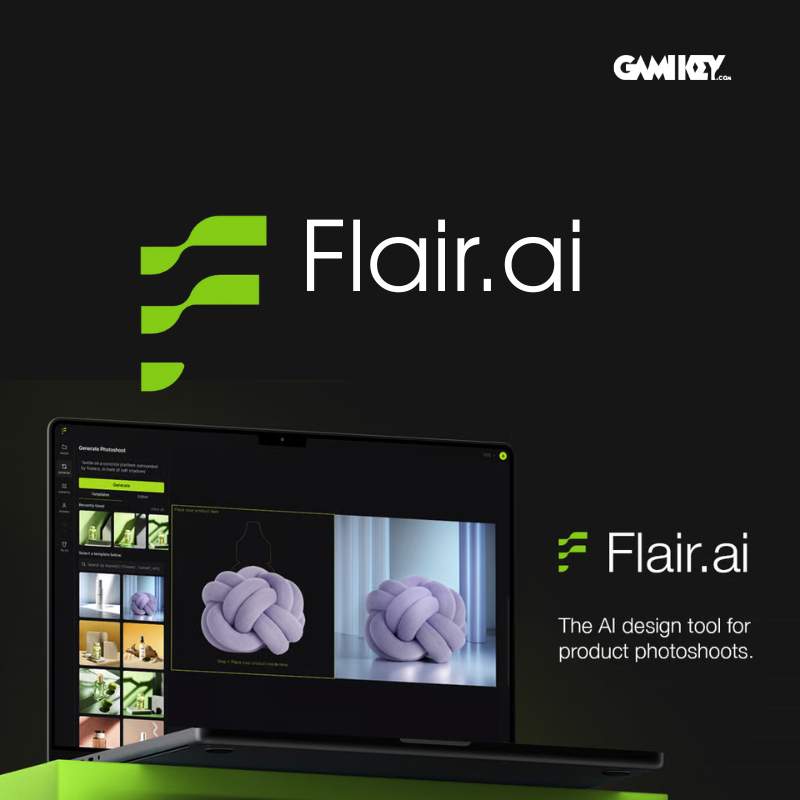
Upgrade to official Flair AI — Creative intelligence, leading the trend at Gamikey.net — Fast payment via USDT (TRC20/BEP20), automatic delivery, and full warranty.
Flair AI is an AI platform specializing in creating product images, editing marketing images, and building visual sales content for e-commerce. Flair's strength lies in helping users create sets of product images in studio, lifestyle, advertising, or social content styles in a short time, instead of having to organize traditional photography that is costly and time-consuming.
Product Upgrade to official Flair AI Suitable for individuals, online shops, sellers on e-commerce platforms, marketing teams, creative agencies, and brands that need to produce product images quickly, beautifully, and consistently. When upgrading on official accountusers can fully utilize Flair's AI image ecosystem on their personal workspace.
Flair AI is designed to support the creation of image content for sales and communication purposes. According to the official introduction and FAQ, this platform allows users to create branded product imagery, build scenes with drag & drop canvas, create AI-generated videostraining custom model for products or people, and use the image editing tool to optimize output.
In simple terms, Flair AI is particularly useful when you want to:
Create beautiful product images to post on the website, Shopee, Lazada, TikTok Shop
Create Facebook Ads, Instagram, banner, landing page ads quickly
create multiple image concepts without having to take many photos
Keep brand image consistent
try many backgrounds, shooting angles, and different design styles
shorten the time from idea to sales content
This is why Flair AI is increasingly suitable for the current e-commerce context: fast content creation, lower costs than traditional photo shooting, and very flexible in creative experimentation.
The free version of Flair has quite clear limitations on the number of image creations, customizable models, and video generation. The official pricing page shows that paid packages significantly expand the quota, rendering speed, image upscale, image variations, custom models, video creation turns, and even add a commercial license in some higher plans.
Task Upgrade to official Flair AI brings great benefits in 3 key points:
First, it works stably on your account.
You don't have to use a stranger's account or shared account, so you have more control over your data, projects, work history, and access rights
Monday, exploiting the full range of creative features.
When upgrading to a paid package, you can create more images, use more custom models, create variations faster, and export high-quality content.
Second, suitable for business goals.
Flair is not just a tool for creating beautiful images, but also aims to create visual content for sales conversion, advertising, and brand recognition
Flair introduces itself as a tool to create high-quality studio product images in seconds using AI product photo generator and editor. Users can drag and drop products, scenes, props, and backgrounds to build scenes directly on the canvas.
This is a very suitable feature for sellers and marketing teams because you don't need to set up a complete shoot to get beautiful sales photos.
One major difference between Flair and other AI image creation tools is its ability to create scenes using drag & dropYou can combine products with different backgrounds, bases, props, and layouts to create more distinctive brand images.
This point is very suitable for e-commerce workers because not everyone is good at prompt. Flair allows both visual manipulation and AI combination, making it easier to get the right image.
According to the official FAQ, Flair supports building custom AI models for products or people. This opens up the possibility of creating personalized and consistent content for brands.
Real example:
Beauty brand wants to maintain the correct appearance of bottles and jars in many contexts
Fashion shop wants to try product demo images
Technology brands want to create device images in multiple advertising concepts
The furniture industry wants to put products into different room contexts
Flair currently has many industry-specific feature pages such as technology, interior design, fashion, showing that this platform is going quite strong into real-world commercial use cases.
In addition to creating new images, Flair also has many editing tools like Magic Erase, Upscale, Generate Variations, Extend Image Dimensions, Regenerate Product and other advanced features in the image editor.
This is a significant advantage because a product image creation workflow often doesn't stop at 'generate', but also requires refinement:
remove redundant objects
enhance image quality
expand the frame for each upload channel
Create more variations to test ads
Reprocess products to match real images
Flair has also integrated the feature AI Product Videos, allowing you to create product videos from images and scene descriptions. The platform says users can choose camera motion styles, describe scenes, and create videos for multiple marketing channels.
This is a notable point, as the current content trend is no longer just static images. For sellers and brands, short videos for social commerce are becoming increasingly important.
Flair's FAQ and pricing show that higher plans have team collaboration support, privacy controls, API access, priority support, and commercial license.
This makes Flair AI not only suitable for individuals but also for:
in-house marketing team
Agency creates content for clients
Brand with multiple product lines
Business wants to automate visual creation process
If you need beautiful product photos every day, Flair AI helps shorten the content creation process and speed up listing.
You can quickly create banners, social images, ad visuals, and creative concepts to test effectiveness.
Flair helps create prototypes quickly, produce large quantities of visuals, and reduce time pressure for the design team.
If you want to build a consistent image set with a clear brand style, Flair is a pretty useful tool.
This group benefits the most as the speed of image creation, concept testing, and visual reuse directly affects conversion rates.
From a digital product and e-commerce perspective, Flair AI has 4 clear values:
Accelerate content production
Instead of waiting for sample shooting, editing, and scene setting, you can create many visuals much faster.
Save image costs
Not every concept is worth investing in shooting right away. Flair helps you try before with AI, then optimizes production costs.
Easy A/B test
You can create multiple image variations to compare ad effectiveness, CTR, or conversion rates. The variations and editor features support this very well.
Maintain brand consistency
With custom models and templates, businesses can maintain the same 'visual language' across multiple sales channels.
With product Official Upgrade, customers can use it directly on their Flair account, making it more convenient for project management, image creation history, and brand data. This form is especially suitable for users who need stability, privacy, and long-term use for work. The content on Flair is closely tied to projects, models, and creative workflows, so using it on a personal account is much more reasonable than on a shared account. This also follows Flair's approach to organizing user experience through accounts, projects, and subscription plans.
Flair AI Official Upgrade — Creative Intelligence, Leading the Trend is a worthwhile consideration for online sellers, marketers, agencies, and brands that need to create product images quickly, beautifully, and flexibly. Flair AI stands out with its ability to create product images using AI, build visual scenes with drag & drop, support custom models, advanced image editing, and expand to video marketing.
If Boss is looking for an AI tool focused on E-commerce, product images, and advertising content, then Flair AI is a very trendy and practical choice.
After you select a package on the website and click "Buy now via Telegram Bot", the Bot system automatically converts the price from USD to USDT and delivers the upgrade directly in the Telegram chat frame after 30 seconds - 5 minutes.
Yes! Gamikey.net commits to a 1-for-1 exchange or refund based on the remaining usage time throughout the entire package period you registered.
Login information and accounts are automatically encrypted by the system and privately delivered via Telegram Bot with detailed usage instructions
All product names, logos, and brands are property of their respective owners. Gamikey is an independent reseller and is not affiliated with Flair.


Clear global pricing in USD/USDT. Pay seamlessly via USDT (TRC20 / BEP20) through our automated Telegram Bot @gamikeybot and receive your credentials in seconds.
Every software license and subscription is priced clearly in USD and settled via USDT.
Fast automated processing with license keys and logins delivered straight to your chat.
Guaranteed replacement or dedicated support throughout your entire subscription period.